Search for accommodation
Learn about the accommodations/search endpoint, the mandatory and optional fields you need to pass in each request to retrieve accommodations that match your travellers' preferences.
→ Use the /accommodations/search endpoint to retrieve accommodations that have at least one available product matching the search criteria.
The request defines the search criteria.
The response returns, for each accommodation:
- The
idof the accommodation. - The best rate and match available product for that accommodation.
- Pricing, policies, and extra details (optional).
- URLs for web and deep-link access.
- The
Create the search request
The /accommodations/search request supports a wide range of input options, allowing you to:
- Cover the full spectrum of travellers’ requirements efficiently.
- Retrieve the optimal set of matching accommodations.
- Maximise the chances of converting a search into a booking.
Example search request
{
  "booker": {
    "country": "gb",
    "platform": "desktop"
  },
  "checkin": "2024-09-12",
  "checkout": "2024-09-14",
  "city": -2612321,
  "extras": [
    "extra_charges",
    "products"
  ],
  "guests": {
    "number_of_adults": 4,
    "number_of_rooms": 2
  }
}
1. Define booker information
The request body must include basic booker details:
booker.country- Two-letter country code of the booker (lowercase).- Use the /common/locations/country endpoint of the Demand API version you are using. Example: "nl"
- Required to ensure tax and fee compliance.
booker.platform- Platform from which the request is made (e.g., "desktop", "mobile", "tablet", etc).- Ensures platform-specific prices and deals are returned correctly.
2. Set travel dates
checkinandcheckout- Traveller arrival and departure dates.- Format: YYYY-MM-DD.
- Mandatory for all search requests.
3. Specify location criteria
You must specify one (and only one) location filter:
regioncitydistrictairportlandmark
→ Use the /common/locations endpoints of the Demand API version you are using, to retrieve the IDs needed.
Landmark searches with coordinates
When using landmarks, you can use the coordinates to restrict the search to a certain distance.
Get the coordinates of a
landmarkby using locations/landmarks endpoints, or of an accommodation by using /accommodations/details.You can then set:
latitude/longitudedefine the centre of the search.radius(in KM) defines the maximum distance.
Example:
{
  "coordinates": {
    "latitude": 52.378281,
    "longitude": 4.900070,
    "radius": 1
  }
}
4. Input guest details and room allocation
You must specify the total number of adults, rooms, and optionally children:
guests.number_of_adults- The number of adults who will be staying.guests.number_of_rooms- The number of rooms they need.
Optional: Use guests.allocation to assign adults and children to each room:
- Create an array of objects under
guests.allocation, one object for each room. - In each object:
In
guests.children, if any children will be staying, add the age of each child who should occupy the room.- For example,
[3,3,8,12]specifies four children, two aged 3, one aged 8 and one aged 12. - Omit the field if no children are staying in this room.
- For example,
In
number_of_adults, add the number of adults who should occupy the room. Each room must contain at least one adult.
{
  "guests": {
    "allocation": [
      {
        "children": [13, 15],
        "number_of_adults": 1
      },
      {
        "children": [2, 3],
        "number_of_adults": 2
      },
      {
        "number_of_adults": 2
      }
    ],
    "number_of_rooms": 3,
    "number_of_adults": 5,
    "children": [2, 3, 13, 15]
  }
}
Rules:
- Allocation objects must match
guests.number_of_rooms. - Adults in allocations must sum to
guests.number_of_adults. - Children in allocations must match children array in
guests.children. - Each room must contain at least one adult.
See the Accommodation search use cases and the Child use cases section for more details and examples.
Optional fields
Optional fields allow you to request additional information or filter results:
accommodations- You can restrict results to specific accommodations using the accommodations array (max 100 IDs).- Example of use case: a list created for a specific purpose, for example: a promotion on your search page for a specific set of properties near a particular beach.
extras- Enrich the response with additional data (does not filter results). Examples: "extra_charges", "products".Example:
{
  "extras": [
    "extra_charges",
    "products"
  ]
}
Refer to Pricing section for more details on extra_charges.
filters(version 3.2) - Filter the search results based on property characteristics:- Facilities, room types, brands.
- Price ranges.
- Stars, review score.
- Meal plans, payment requirements.
- Sustainability certifications, LGBTQ+ friendly (Travel Proud)
- 24-hour reception, dormitories inclusion/exclusion.
sort- sort results bydistance,price,review_score, orstars.direction: ascending or descending.
Descending direction is not supported for distance.
Search results
Search results are returned as an array of accommodations (data) with most affordable available products.
Each accommodation in the response includes:
id→ Accommodation IDcurrency→ Accommodation and booker currency.deep_link_url→ Affiliate deep link.url→ Public Booking.com web page.price→ with base, charges, display, total.products→ Array of products, each containing:id,room,bundle(nullable),deal(nullable)inventory.type→ sell or third_partynumber_of_adultspolicies.cancellation,policies.meal_plan,policies.payment.price→ base, charges, display, total in v3.2 and, base, book, extra_charges and total in v3.1.
Top picks
However, results can also be retrieved based on "popularity" ("Our top picks" in Booking.com website):
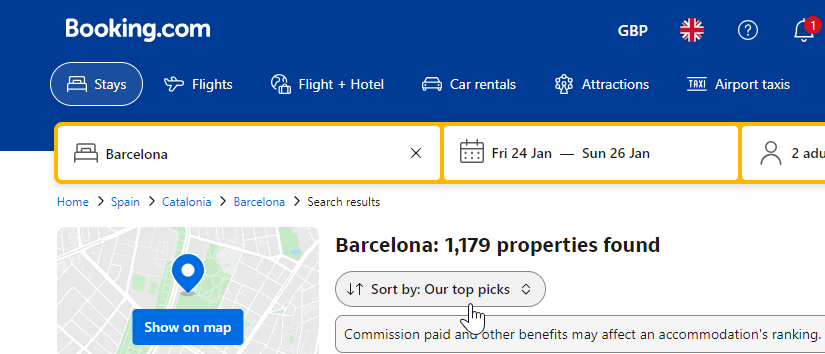
- If you specify either the
countryorregionin the search request, the results will be sorted by popularity ("Top picks") (in descending order). - Hence, the most "popular" accommodations for the selected location will appear high up on the results page by default.
If you decide to use the "Sort.by" filter with any of the given options, like price, review_score or distance, then the search results will retrieve accommodations based on that sorting criteria instead. See the sorting guide
Pagination
- Maximum 1000 properties per search (10 pages × 100 results).
- Use
metadata.next_pageto retrieve the next page.
See pagination guide for details.
Example response:
{
  "request_id": "01fr9ez700exycb98w90w5r9sh",
  "data": [
    {
      "id": 10004,
      "currency": { "accommodation": "EUR", "booker": "EUR" },
      "deep_link_url": "booking://hotel/10004?...",
      "price": { ... },
      "products": [ ... ],
      "url": "https://www.booking.com/hotel/nl/..."
    }
  ],
  "metadata": {
    "next_page": "token_abc123"
  }
}
When no results are returned
A search may return no accommodations if:
- The property is closed or temporarily unavailable.
- Search parameters do not match property policies (e.g., children at “Adults only” properties).
Check request parameters and property availability if no results are returned.
Closed property
To find if a property is closed today, use the /accommodations/details/changes endpoint to check whether the property has a "closed" status.
The response (in v3.2) provides the closure status:
"closed": {
  "fraud": [123456789],
  "permanently": [14100826],
  "temporarily": [13641323]
}
Important note on product coverage
Not all Booking.com products are available via the Demand API.
This means the set of accommodations or prices returned through the API may differ from what you see on the Booking.com website or app.
Partners should not compare prices between the Demand API and Booking.com front end, as the coverage and availability are not intended to match one-to-one.
The Demand API is designed to provide a consistent, integrator-friendly product set. It is not a full mirror of Booking.com’s consumer front end.
- Refer to the Search use cases section for more examples on how to get top picks.
- Check the Filtering and sorting guide for details and best practices when filtering and sorting results.
- See the Pagination guide for instructions on paginating search results.